For trade show buyers
An app to record vendors, products and prices at trade shows
Show Sourcing is a CRM built for the booth. At Canton Fair, Global Sources, the Hong Kong fairs or a factory visit, you photograph a product, add the vendor and the price, and the app works out the landed cost. Your team sees it on their phones a few seconds later.
At the booth, in under a minute
Photograph the product
Take photos or a short video, add a voice note, and draw on a photo to mark a detail. It works without internet; the app uploads when you are back online.
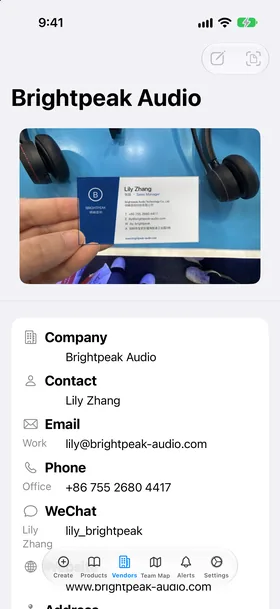
Add the vendor
Scan the business card. The app reads the name, company, phones, emails, WeChat, website and address. Or tap a vendor you already have.
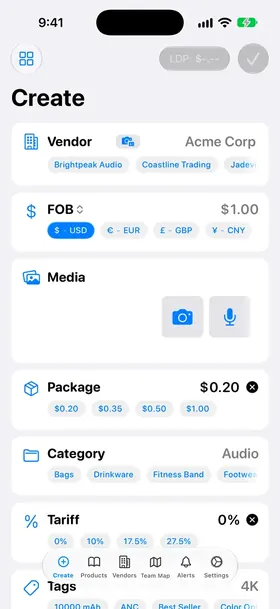
Enter the price
FOB (or CIF, EXW, DDP) in any currency, price breaks for bigger orders, MOQ, packaging and units per container.
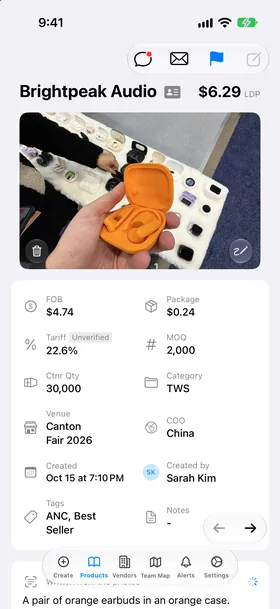
See the landed cost
The app adds packaging, US tariff (HTS with Section 301) and the freight share of one unit, so you see LDP before you leave the booth.
At the big shows the app fills in the venue for you.
After the show
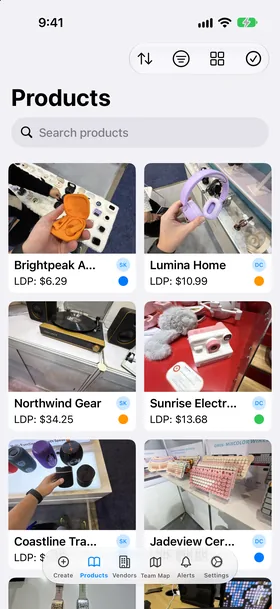
Find anything
Search vendor, category, notes, venue and even the words printed on the box in your photos. Filter by FOB, LDP, MOQ, status, show or teammate.
Follow up
Mark each product's status, such as Sample Requested, and email the vendor from a template filled with the product details.
Work as a team
Everyone on the team sees new products in seconds, comments with @mentions, and can see teammates on the Team Map during the show.
Ask your AI
Connect ChatGPT or Claude to your catalog and ask, for example, "show me all speakers under $5".
Questions
What is Show Sourcing?
Show Sourcing records the products you find at trade shows. You take photos, add the vendor and the price, and the app calculates the landed cost. Your team sees every product on their own phones.
Does the app work without internet?
Yes. You can create and edit products offline. The app saves them on the phone and uploads them when you are online again. Settings > Data > Sync Queue shows what is still waiting to upload.
How does the app know which show I am at?
The app knows the places of the big trade shows. When you are at one, it fills the Venue for new products. You can change the venue at any time.
How do I add a vendor from a business card?
In Vendors, tap + and choose Scan Cards. Take a photo of each card. Tap Save. The app reads the name, company, phones, emails, WeChat, website and address in the background.
What is LDP and how does the app calculate it?
LDP (landed duty paid) is the cost of one unit at your door. The app adds the price, packaging, the tariff and the freight share of one unit. Settings > LDP Calculation > How LDP Works shows the full formula with your numbers.
Who sees my products?
Everyone on your team. Products sync to all team phones in a few seconds. People outside your team never see them.
Which devices can I use?
iPhone, iPad and Mac (the same app from the App Store). You can also sign in to the web portal at app.showsourcing.app to see your team's products and vendors in a browser.
How much does Show Sourcing cost?
You pay per seat (one seat for each person). Yearly is $8.50 a seat a month. 6 months is $10 a seat a month. Teams of 10 or more get a discount. Every plan starts with a 30-day free trial. See showsourcing.app/pricing.
More answers in Help & FAQ.
Try it at your next show
Every plan starts with a 30-day free trial. Then $10 a seat a month on the 6-month plan, or $8.50 a seat a month billed yearly. Teams of 10, 15 and 20 seats get 5%, 10% and 15% off.
iPhone, iPad and Mac. Web portal at app.showsourcing.app.