Quotes, MOQ and price breaks
Track supplier quotes, MOQ and price breaks across trade shows
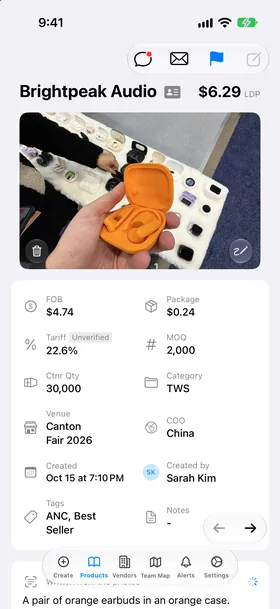
Vendors quote in different currencies, on different terms, with different minimums. Show Sourcing keeps every quote on the product it belongs to, turns it into a landed cost you can compare, and keeps it next to the vendor and the photos.
What you record for each quote
Price and terms
FOB, CIF, EXW or DDP. The app knows what each one includes, so LDP leaves out freight on CIF and adds the factory cost on EXW.
Any currency
Enter RMB, euros or any other currency. The app converts to US dollars for LDP with daily rates.
Price breaks
A row per quantity, such as 1,000 at $2.40 and 5,000 at $2.15, in the order you choose. The smallest quantity's price is the FOB.
MOQ and packaging
Minimum order, package cost and units per container, which set each unit's share of the freight.
How you compare them
One number to compare
LDP puts every quote on the same footing: price, packaging, tariff and freight for one unit at your door.
Sort and filter
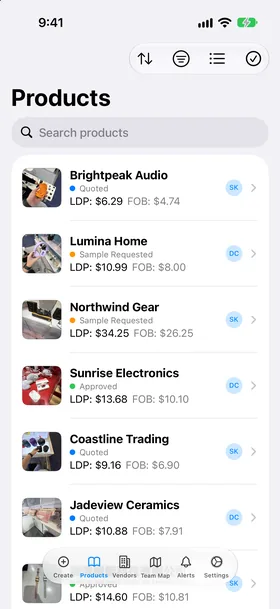
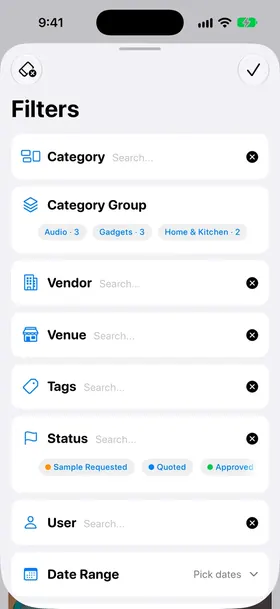
Sort products by LDP, FOB, MOQ or vendor. Filter by an LDP or FOB range, a category group, a show or a status.
Per vendor
A vendor's page lists every product and quote from that vendor, with their contacts and card photo.
Pick which break counts
Choose whether the list and LDP use the lowest or the highest quantity of each price ladder.
Questions
How do I enter a lower price for a bigger order?
Turn on Settings > Quick Selections > Price Breaks. Then tap Add Price Breaks under FOB on a product. Enter a quantity and a price on each row. The red minus deletes a row. The smallest quantity's price is the FOB.
Which price break does the app use for LDP?
Settings > Quick Selections > Price Breaks > Display Cost. Lowest Qty uses the first row. Highest Qty uses the last row. The choice changes the price and LDP on the product page, in the list and in sorting.
What are FOB, CIF, EXW and DDP?
They tell the app what the vendor's price includes. FOB: the goods are on the ship. CIF: freight is in the price, so LDP leaves freight out. EXW: the price is at the factory, so the app adds an EXW cost per container. DDP: the vendor pays the duty too. Pick a term on each product. Set the default in Settings > LDP Calculation > Default Price Term.
Can I enter prices in other currencies?
Yes. Pick the currency on the product. The app changes it to US dollars for LDP with daily rates. Choose your common currencies in Settings > Quick Selections > Currency.
What is LDP and how does the app calculate it?
LDP (landed duty paid) is the cost of one unit at your door. The app adds the price, packaging, the tariff and the freight share of one unit. Settings > LDP Calculation > How LDP Works shows the full formula with your numbers.
Where do the tariff rates come from?
From the official US tariff schedule (HTS), with Section 301 for China and the country rates. The team owner links each category to a tariff code in Settings > LDP Calculation > Tariff Codes. Then every product in that category gets that rate.
How do I sort products?
Use the sort menu in Products. Sort by date created, LDP, FOB, vendor, MOQ or status. Pick the same field again to reverse the order.
How do I filter products?
Tap the filter button in Products. Filter by vendor, category, category group, tags, status, venue, team member, date, FOB, LDP, MOQ, comments and custom fields. Hold the filter button to clear all filters.
More answers in Help & FAQ.
Try it at your next show
Every plan starts with a 30-day free trial. Then $10 a seat a month on the 6-month plan, or $8.50 a seat a month billed yearly. Teams of 10, 15 and 20 seats get 5%, 10% and 15% off.
iPhone, iPad and Mac. Web portal at app.showsourcing.app.